Last updated: November 21, 2026
POS system cost can vary significantly depending on your business needs. A point-of-sale (POS) system can be one of the most important tools for running a small business—but how much should you budget for one?
The answer depends on your hardware, software subscription, payment processing fees, and business requirements.
Some businesses can start with a basic card reader and no monthly software subscription. Others need a complete checkout station, inventory management, multiple terminals, and advanced reporting tools.
This guide explains the main POS costs, provides real pricing examples from major providers, and shows you how to estimate your first-year expenses.
On This Page
How Much Does a POS System Cost in 2026?
There is no single price for every POS system.
For example, Square advertises a contactless and chip card reader for $59, a Square Terminal for $299, and a Square Register for $899.
These are hardware prices, not estimates of a complete business’s total POS expenses.
Software subscriptions, payment processing fees, accessories, taxes, and other charges may increase the overall cost.
1. POS Hardware Costs
POS hardware refers to the physical equipment used to complete transactions.
Common equipment includes:
- Card readers and payment terminals
- Checkout registers and touchscreen displays
- Receipt printers
- Barcode scanners
- Cash drawers
- Customer-facing displays
The hardware you need depends on how your business operates.
A mobile service provider might only need a portable reader, while a busy retail store may benefit from a dedicated register and additional accessories.
Real-world example: Square hardware
| Product | Advertised hardware price |
|---|---|
| Square Reader for contactless and chip | $59 |
| Square Terminal | $299 |
| Square Register | $899 |
Source: Square Hardware Pricing
Prices are subject to change and may exclude taxes, shipping, financing charges, and optional accessories.
2. POS Software Subscription Costs
POS software helps businesses manage transactions, sales reports, inventory, customers, and employees.
Some providers offer free entry-level software, while advanced plans require monthly subscriptions.
For example:
- Square: Offers a free POS software plan with payment processing fees charged when payments are accepted.
- Shopify: Offers in-person selling features with paid Shopify plans. Shopify POS Pro costs an additional $89 per month per location under its advertised pricing terms.
- Toast: Advertises a restaurant POS software plan starting at $69 per month, with other packages and commercial terms available.
Software features, billing requirements, and available plans vary.
Sources: Square Pricing, Shopify POS Pricing, and Toast Pricing.
3. Payment Processing Fees
Payment processing fees are separate from POS hardware and may be charged on every card transaction.
Payment processing fees can significantly affect your total POS system cost, especially when your business handles a high volume of card transactions.
Many providers use a pricing formula consisting of a percentage of the sale plus a fixed transaction fee.
For example, an illustrative fee of 2.6% + $0.15 per transaction would produce the following calculation:
Assumptions:
- Monthly card sales: $10,000
- Number of transactions: 200
- Processing rate: 2.6%
- Per-transaction fee: $0.15
Estimated monthly fees:
Percentage fees: $10,000 × 2.6% = $260
Transaction fees: 200 × $0.15 = $30
Total estimated monthly processing fees: $290
Over 12 months, that would equal $3,480, assuming sales and transaction counts remain constant.
This example does not include extra account fees, refunds, disputes, or other possible charges.
Actual processing rates vary by provider, plan, transaction method, and merchant agreement.
4. Setup and Additional Costs
Before choosing a POS system, consider expenses beyond the advertised hardware and software prices.
These may include:
- Installation and configuration
- Additional registers or terminals
- Internet and networking equipment
- Optional integrations
- Inventory management upgrades
- Employee management tools
- Support and training
- Hardware replacement
- Contract termination or cancellation charges, when applicable
Ask providers for a detailed quote showing both upfront and recurring expenses.
5. Example: First-Year POS Cost
Consider a fictional small retail business choosing the following setup:
To estimate your first-year POS system cost, combine upfront equipment expenses with recurring software and service charges.
| Expense | Example cost |
|---|---|
| POS hardware | $299 |
| Initial setup | $30 |
| Monthly software | $50 |
| Annual software (12 months) | $600 |
| Estimated first-year total | $929 |
This is an illustrative budget, not a quoted bundle from any provider.
The estimate excludes payment processing fees, taxes, and additional services.
Businesses should compare the total cost over at least one year rather than focusing exclusively on the initial hardware price.
6. How to Choose the Right POS System
Before selecting a POS provider, evaluate what your business actually needs.
Consider the number of checkout locations, expected transaction volume, inventory requirements, staff permissions, software integrations, and available support.
Request pricing in writing and confirm whether hardware is purchased, leased, or bundled with a subscription.
It is also important to check which payment processors are supported and whether switching providers is possible.
A lower advertised starting price does not necessarily mean a lower overall cost.
7. Estimate Your POS Costs
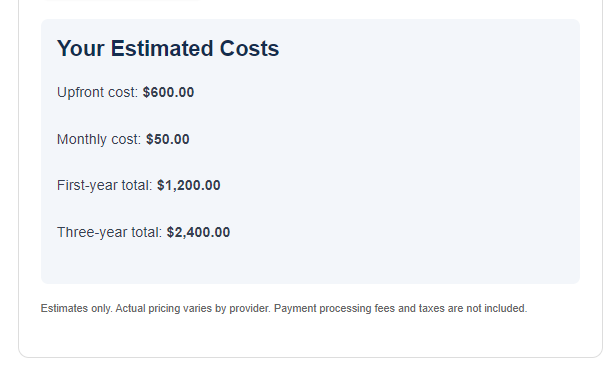
BizCostLab offers a free POS Cost Calculator that helps businesses estimate:
- Upfront hardware and setup expenses
- Recurring monthly costs
- First-year POS expenses
- Estimated three-year costs
Use the calculator to compare different pricing scenarios before making a purchase.
The calculator provides estimates for educational purposes. Payment processing charges and taxes are not included in its current POS cost calculations.
Frequently Asked Questions
Can a POS system be free?
Some providers offer POS software without a monthly subscription charge. However, hardware, payment processing fees, and optional services may still cost money.
Do POS systems charge monthly fees?
Some do. Monthly charges depend on the provider, selected software plan, number of locations, and additional features.
Are payment processing fees included in POS software pricing?
Not necessarily. Businesses should review software subscription charges and payment processing terms separately.
Is a more expensive POS system always better?
No. The right choice depends on your business requirements, desired features, support needs, and total operating cost.
Final Thoughts
A good POS purchasing decision starts with understanding the full cost of ownership.
Compare hardware, recurring subscriptions, payment processing charges, and possible additional fees before choosing a system.
Use independent cost estimates alongside official provider quotes to make a more informed decision.
Comparing POS system cost across providers can help small business owners identify pricing differences and avoid unexpected expenses.
Editorial note: Prices referenced in this guide were checked against publicly available provider pages in November 2026. Prices, promotions, and eligibility conditions may change. BizCostLab provides educational information, not personalized financial advice.