Choosing between a POS system and a payment terminal can affect more than how your business accepts card payments. While a standalone payment terminal primarily handles transactions, a POS system can also support sales tracking, inventory management, and reporting. Some modern terminals combine both functions. In this guide, we’ll compare their features, costs, and practical uses to help U.S. small business owners decide which setup makes the most sense.
POS System vs. Payment Terminal: Quick Answer
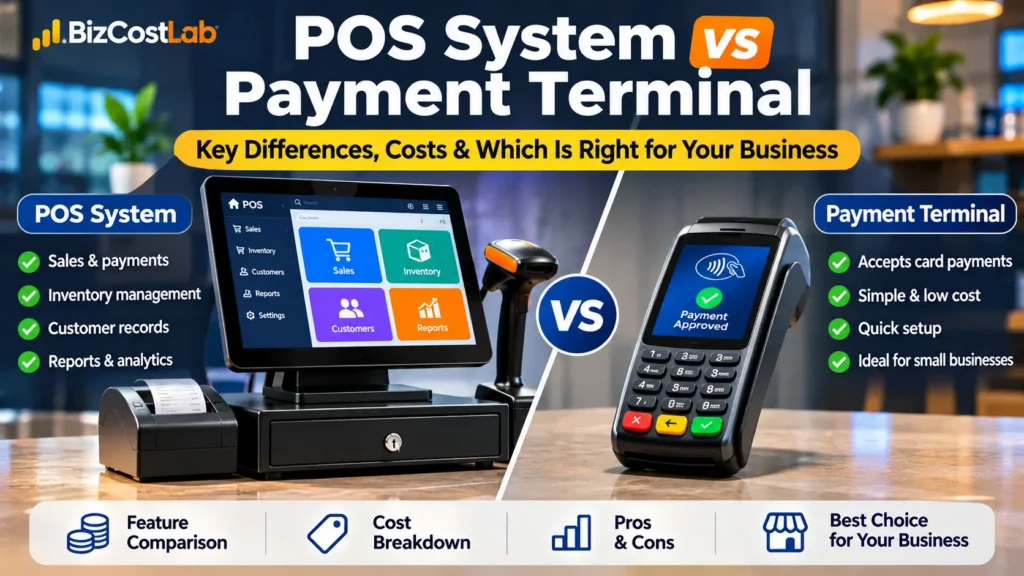
A payment terminal may be enough if your main goal is to accept in-person card payments. A full POS system is usually more suitable when you also need integrated tools for managing sales, inventory, employees, or customer information. However, some modern payment terminals include POS features, so the best choice depends on your business needs, device capabilities, and total costs.
On This Page
What Is a POS System?
A point-of-sale (POS) system is a combination of software and, when needed, hardware that businesses use to record sales, accept payments, and manage daily operations.
Modern POS systems can go beyond processing credit and debit card transactions. Depending on the provider and subscription plan, they may include tools for inventory management, sales reporting, employee access, customer profiles, refunds, and business performance tracking.
A typical POS setup may include:
- POS software: Records transactions, calculates totals, and manages sales information.
- Touchscreen or computer: Allows employees to enter orders and complete sales.
- Card reader or payment terminal: Accepts supported payment methods.
- Receipt printer: Produces printed receipts when needed.
- Barcode scanner: Helps retailers identify products at checkout.
- Cash drawer: Supports cash transactions.
- Management dashboard: Provides reports and operational information.
Not every business needs all these components.
For example, a mobile service provider may operate with a smartphone and a compatible card reader, while a busy retail store may need a countertop register, barcode scanner, receipt printer, and integrated inventory software.
Common POS System Features
The features available depend on the software provider, hardware configuration, and selected plan.
Sales Management
A POS system can record purchases, apply discounts, calculate taxes, and handle returns.
Inventory Tracking
Retail-focused systems may update stock quantities as products are sold, helping businesses identify low inventory and monitor product performance.
Employee Management
Some systems provide individual employee accounts, permissions, time tracking, and staff performance reporting.
Customer Management
Depending on the platform, businesses may maintain customer profiles, purchase histories, and loyalty information.
Reporting and Analytics
POS software can provide sales summaries, transaction reports, product performance information, and other useful business metrics.
Example: A Retail Store
Imagine a small clothing store selling 200 different products.
A basic card terminal might allow the store to accept payments, but an appropriate retail POS system could also help employees identify products, manage stock, process returns, and generate sales reports.
For this business, the additional operational tools may justify the cost of a POS system.
However, the value depends on which features the store actually uses.
What Is a Payment Terminal?
A payment terminal is a device used to accept electronic payments, such as credit cards, debit cards, and supported contactless payment methods.
Traditional standalone terminals primarily handle payment authorization and related transaction functions.
They may connect to a payment processor through Wi-Fi, Ethernet, or a supported cellular connection, depending on the device.
A typical payment terminal can support some combination of:
- Chip card payments
- Contactless cards
- Supported mobile wallets
- PIN entry
- Transaction receipts
- Refunds and other payment operations
- Communication with a payment processor
The exact capabilities depend on the hardware, software, processor, and merchant agreement.
Types of Payment Terminals
1. Countertop Payment Terminals
These devices are commonly used at fixed checkout locations.
They may connect to a business network and remain near a cashier or sales counter.
2. Portable Payment Terminals
Portable devices allow employees to bring the payment terminal to customers.
This can be useful for restaurants, mobile services, and businesses that want more flexibility during checkout.
3. Mobile Card Readers
Compact card readers can work with compatible smartphones or tablets and a payment application.
They may be suitable for small businesses with limited hardware requirements.
4. Smart Payment Terminals
Smart terminals may include touchscreens, receipt printers, applications, and additional transaction-management features.
Some are capable of running POS software directly.
Important: A Payment Terminal Can Also Be a POS System
The distinction between POS systems and payment terminals is not always absolute.
For example, Square Terminal combines payment acceptance, POS software, and a built-in receipt printer in one device.
Stripe Terminal also supports different types of readers, and selected devices can support additional application functionality.
Therefore, a merchant should compare the actual features of a particular device rather than assuming every payment terminal has the same limitations.
POS System vs. Payment Terminal: Key Differences
The main difference is the scope of the solution.
A standalone payment terminal focuses on accepting payments, while a full POS system generally supports a broader range of business operations.
However, modern integrated devices can provide features associated with both categories.
| Feature | Full POS System | Standalone Payment Terminal |
|---|---|---|
| Accept card payments | Usually, with compatible payment hardware or another supported method | Yes, for supported payment methods |
| Record itemized sales | Commonly available | Limited or dependent on software |
| Inventory management | Often available | Usually limited without added POS software |
| Sales reporting | Often detailed | Usually more payment-focused |
| Employee management | Available on some platforms | Usually limited |
| Customer profiles | Available on some platforms | Usually limited |
| Receipt printing | Available with compatible hardware | Device-dependent |
| Software subscriptions | Free and paid plans exist | Device and provider-dependent |
| Hardware requirements | Can involve one or several devices | Often a single device |
| Setup complexity | Depends on features and integrations | Often simpler for basic payment acceptance |
| Best suited for | Businesses needing payment and operational tools | Businesses primarily needing payment acceptance |
Note: These are general characteristics, not universal rules. Smart terminals and integrated payment solutions may provide many POS features.
Which One Is Easier to Use?
A standalone terminal may be easier to introduce into a business that already has a separate system for recording sales.
For example, a service provider that already creates invoices through accounting software may only need a reliable way to accept payments.
A full POS system may require more initial configuration, especially when importing products, managing employee accounts, or connecting multiple devices.
However, once configured, its integrated features may simplify daily operations.
Cost Comparison: Hardware, Software, and Payment Fees
Understanding the costs is one of the most important parts of choosing between a POS system and a payment terminal.
A lower hardware price does not always mean a lower total operating cost.
Businesses should consider both initial and recurring expenses.
1. Hardware Costs
Hardware expenses can include the payment device, register, tablet, printer, barcode scanner, and cash drawer.
A business that only needs payment acceptance may require fewer devices.
A business using a complete POS setup may need additional equipment depending on its workflow.
Some all-in-one devices combine multiple functions, potentially reducing the need for separate hardware.
Before buying any equipment, confirm compatibility with the intended payment processor and POS platform.
2. Software Subscription Costs
POS software may be offered through free plans, paid subscriptions, or customized business agreements.
Paid features can include advanced inventory management, additional reporting, multiple locations, staff permissions, or specialized industry tools.
Standalone terminal providers may also charge monthly service or account fees.
Never assume that a terminal has no recurring costs simply because it does not use a separate POS subscription.
3. Payment Processing Fees
Both POS systems and payment terminals can involve processing fees when customers pay by card.
Depending on the provider, fees may include:
- A percentage of the transaction amount
- A fixed amount per transaction
- Monthly account charges
- Additional fees for certain transaction types
A processor might advertise flat-rate pricing or an interchange-plus structure.
These charges should be compared separately from software and hardware costs.
4. Additional Costs
Other potential expenses include equipment accessories, receipt paper, network services, installation, integrations, replacement devices, chargebacks, and contractual fees.
Not every provider charges every fee.
The correct approach is to request a complete pricing breakdown before selecting a solution.
Example: Comparing First-Year Costs
Let’s compare two hypothetical setups for a small U.S. business.
These figures are illustrative assumptions, not current offers from any provider.
Assume the business processes:
- Monthly card sales: $15,000
- Monthly transactions: 300
- Example processing rate: 2.7% + $0.10 per transaction
Monthly processing fees:
($15,000 × 2.7%) + (300 × $0.10)
= $405 + $30
Estimated monthly processing fees: $435
Estimated annual processing fees:
$435 × 12 = $5,220
Now compare two possible equipment and software arrangements.
Scenario A: Basic Payment Terminal Setup
Assume:
- One-time terminal hardware cost: $180
- Additional monthly software fee: $0
- Annual processing fees: $5,220
Estimated first-year total:
$180 + $5,220 = $5,400
This example assumes no separate monthly software charges or other account fees.
Scenario B: Full POS System Setup
Assume:
- Initial hardware cost: $850
- Monthly software subscription: $49
- Annual processing fees: $5,220
Annual software fees:
$49 × 12 = $588
Estimated first-year total:
$850 + $588 + $5,220 = $6,658
First-Year Cost Comparison
| Expense | Basic Terminal | Full POS System |
|---|---|---|
| Initial hardware | $180 | $850 |
| Annual software | $0 | $588 |
| Annual processing fees | $5,220 | $5,220 |
| Estimated first-year total | $5,400 | $6,658 |
Under these assumptions, the full POS system costs $1,258 more during the first year.
However, that difference does not establish which option offers better value.
A business that needs inventory tracking, integrated sales reporting, and employee management may benefit enough from those functions to justify the additional expense.
The example also assumes identical processing rates for both setups. Actual providers may offer different rates, subscriptions, and contractual terms.
A terminal-only setup may also require separate software or administrative work, which should be included in a more complete comparison.
The important question is not simply which device costs less. It is which setup delivers the necessary functions at a reasonable total cost.
Which Option Is Right for Your Business?
The right choice depends on how your business operates and which functions you need beyond payment acceptance.
Small Retail Stores
Retailers often benefit from POS systems that can manage product catalogs, inventory, returns, and sales reports.
A small shop with very few products may not require an advanced system, but a growing store with numerous stock items may find integrated inventory management useful.
Consider: A retail POS system with compatible payment hardware.
Restaurants and Cafés
Restaurants may need features such as menu management, order routing, tips, table service, and kitchen integrations.
A portable payment terminal can be useful for taking payments at tables, but payment acceptance alone may not cover the restaurant’s operational requirements.
Consider: A restaurant-focused POS platform with appropriate payment devices.
Freelancers and Mobile Service Businesses
Consultants, technicians, and mobile service providers may primarily need a convenient way to receive customer payments.
For a business with limited inventory and a simple checkout process, a compatible mobile reader or payment terminal may be sufficient.
Consider: A simple mobile payment setup before investing in advanced POS features.
Beauty Salons and Appointment-Based Businesses
These businesses may benefit from appointment scheduling, customer records, staff management, and integrated payments.
A standalone terminal can accept payments, but it may not replace the operational tools needed to organize appointments.
Consider: A service-oriented POS or booking platform with integrated payment acceptance.
Online and Physical Retail Businesses
Businesses selling both online and in person may benefit from systems that coordinate orders, inventory, and customer information across channels.
An isolated payment terminal may process in-store purchases without automatically synchronizing all business data.
Consider: A POS system with supported e-commerce integration.
Businesses With Multiple Locations
Multiple locations can introduce more complex reporting, inventory, and employee management requirements.
A POS platform designed for multi-location operations may provide better visibility than separate, disconnected terminal setups.
Consider: A system that supports centralized reporting and appropriate location-level controls.
Hidden Costs and Compatibility Issues
Even a reasonably priced POS or terminal setup can become expensive if important details are overlooked.
Payment Processor Compatibility
Some payment devices are designed to work with specific payment processors or software platforms.
Buying an unsupported terminal can create integration problems or make the device unusable with your chosen provider.
Confirm compatibility before ordering hardware.
Equipment Ownership and Contracts
A merchant may be offered equipment for purchase, rental, or under a financing agreement.
Compare the complete contractual cost instead of only the advertised monthly payment.
Also review cancellation terms and any equipment return requirements.
Software Integrations
A business may need its POS system to communicate with accounting software, inventory platforms, or an online store.
An integration may require a compatible subscription or an additional service.
Internet and Connectivity Requirements
Payment devices differ in their network requirements and offline capabilities.
Some can accept certain payments during a temporary internet interruption, subject to restrictions and additional risk.
Never assume offline payments are supported without checking the provider’s documentation.
Security and Compliance
Payment acceptance involves security responsibilities.
Businesses should use supported, approved payment hardware and follow the security requirements applicable to their merchant environment.
A payment terminal does not automatically eliminate every merchant security or compliance obligation.
Support and Replacement Costs
Consider technical support availability, hardware warranty coverage, replacement procedures, and how a device failure could affect business operations.
A lower initial purchase price may not be worthwhile if downtime becomes expensive.
How to Estimate Your POS Costs With BizCostLab
Before selecting a POS system or payment terminal, estimate the full cost of your preferred setup.
BizCostLab provides a free POS Cost Calculator that can help you model important equipment and software expenses.
To use it:
- Identify the hardware needed for your business.
- Enter your estimated equipment costs.
- Add relevant monthly software or subscription expenses.
- Include other setup costs supported by the calculator.
- Review your estimated upfront, monthly, and first-year costs.
You can run separate estimates for a basic terminal setup and a more complete POS arrangement.
For a broader assessment, calculate payment processing fees separately using BizCostLab’s Payment Processing Fee Calculator.
These tools provide estimates based on your inputs. They do not independently verify provider quotes, compatibility, or all possible contractual fees.
For additional context, read our How Much Does a POS System Cost? (2026 Pricing Guide).
Comparing total costs can help you identify expenses that may be easy to overlook when focusing only on hardware prices.
Checklist: What to Ask Before Buying
Before committing to a payment terminal or POS provider, ask the following questions:
- Which payment methods does the system accept?
- Is the hardware compatible with my payment processor?
- Does the system include inventory or sales management?
- What software features are included in the advertised plan?
- What is the total hardware purchase or rental cost?
- Are there monthly software or account fees?
- What processing rates apply to my transactions?
- Are refunds and chargebacks subject to additional charges?
- Can I export sales and transaction data?
- Does the system support my business’s required integrations?
- What happens if my internet connection fails?
- What warranty and customer support are included?
- Can the solution scale if I add employees or locations?
A clear answer to these questions can help prevent unexpected costs and operational problems.
Frequently Asked Questions
Is a POS system the same as a payment terminal?
Not always. A POS system generally includes software for recording sales and may provide additional business management features. A standalone payment terminal primarily accepts electronic payments. However, some modern smart terminals combine both functions.
Can I accept credit cards without a full POS system?
Yes. Depending on your business and provider, you may be able to use a standalone terminal, a compatible mobile card reader, or another supported payment acceptance solution.
Is a payment terminal cheaper than a POS system?
It can have a lower initial equipment cost, but this is not guaranteed. Total expenses depend on hardware, subscriptions, processing rates, additional services, and merchant contract terms.
Do all POS systems require monthly subscriptions?
No. Some providers offer software plans without a monthly subscription fee, while others charge recurring fees for advanced functionality. Payment processing and hardware expenses may still apply.
Can a payment terminal manage inventory?
Some modern smart terminals support POS applications and related inventory functions. Traditional standalone payment terminals generally provide more limited business management capabilities.
What is the difference between a card reader and a payment terminal?
A card reader is a device used to capture supported card payment information. A payment terminal may include a card reader along with a display, PIN entry, transaction software, and other features. The terms are sometimes used interchangeably, but device capabilities vary.
Can a POS system work without a payment terminal?
Sometimes. A POS system can record certain sales without a separate terminal, and supported setups may accept payments through alternative methods. However, in-person card payments generally require an appropriate payment acceptance solution.
Which is better for a small retail business?
A POS system may be more useful when the business needs inventory tracking, product management, and detailed sales reporting. A simpler terminal may be sufficient for a business with basic payment requirements.
Can I connect any payment terminal to my POS software?
No. Compatibility depends on the terminal model, processor, supported integrations, and software platform. Verify compatibility before purchasing equipment.
Should I choose a POS system based only on processing fees?
No. Processing fees are important, but businesses should also compare hardware, subscriptions, compatibility, support, operational features, and the complete cost of ownership.
Final Verdict: POS System vs. Payment Terminal
Choosing between a POS system and a payment terminal requires understanding the difference between payment acceptance and broader business management.
A standalone payment terminal can be a practical solution for businesses that primarily need to accept card payments.
A full POS system may be a better fit for businesses that need inventory management, detailed reporting, employee controls, and integrated sales workflows.
Modern smart terminals can blur the distinction by offering payment acceptance and POS functionality in a single device.
For U.S. small business owners, the best decision depends on the specific provider, required features, transaction volume, software compatibility, and total costs.
Before buying, compare complete provider quotes and calculate your estimated first-year expenses.
The best payment setup is the one that supports your business operations without adding unnecessary complexity or cost.
Official Sources and Further Reading
These official resources can help readers verify features, compare supported devices, and understand the available payment and POS solutions:
- Square — Point of Sale Systems
- Square — POS Hardware and Equipment
- Square — Set Up Square Terminal
- Stripe — Terminal Payment Devices
- Stripe — In-Person Payment Solutions
- Shopify — POS Features
- Shopify — POS Pricing and Plans
Editorial note: This guide is intended for educational purposes and focuses on U.S. small business use cases. Features, pricing, availability, and contractual terms may change. Numerical cost comparisons are illustrative scenarios rather than actual merchant offers. Verify current details with the relevant provider before making a purchase decision.